
If you receive an error when attaching a document to an SF424 related to the size of a PDF (Figure 1), it is because the attached document is not 8.5x11 inches in size.
If you are receiving this error:
- Download all PDFs attached in the SF424, and check the file size: open the document, select “File/Menu” and then “Properties”. All documents should be 8.5x11 inches.
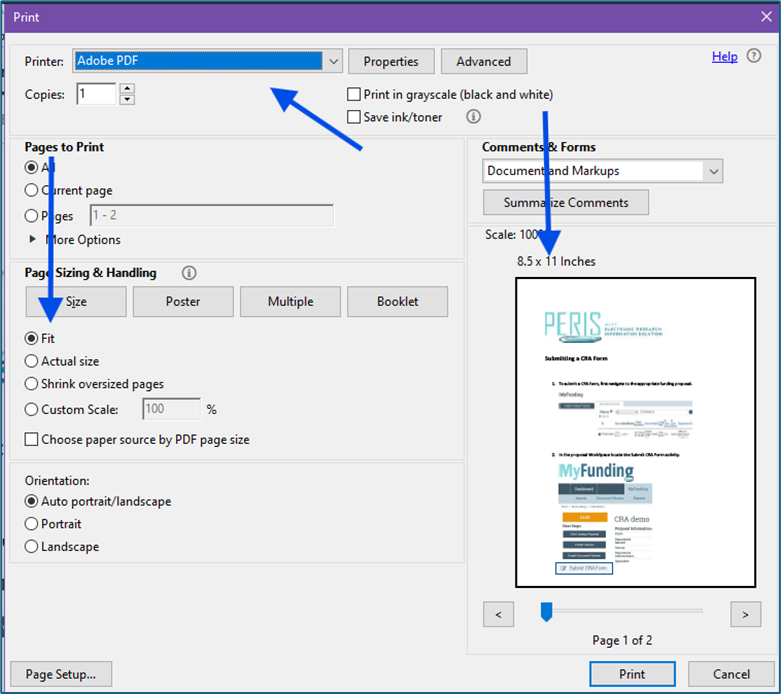
- For documents that are not 8.5x11 inches (Figure 2), go to “File/Menu” and then “Print”. For the printer, select “Adobe PDF”, then select “Fit” and the page will default to 8.5x11 inches (Figure 3).
Figure 1. SF424 error message

Figure 2. Incorrect document size example
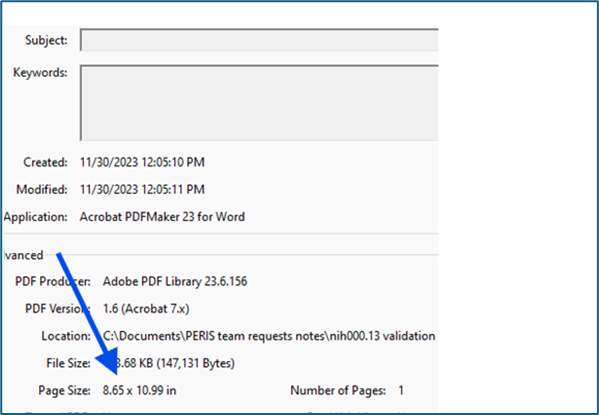
Figure 3. Resizing the document
News Categories