
You may need to create an Amendment for an Agreement in MyRA for a variety of reasons - time extension, change in materials/data, change in PI, etc. To create an Amendment, the Agreement must be in ‘Active’ state and with no other pending Amendments.
An Amendment can be created in the Agreement workspace to address these changes. From the Agreement tab, enter the Agreement number in the box and click on the magnifying glass (Figure 1). Click on the Agreement number and then click ‘Create an Amendment’ from the menu on the left (Figure 2). In the Amendment Information SmartForm, choose the reason(s) for the Amendment and click ‘Save’ (Figure 3).
Figure 1. Find Agreement
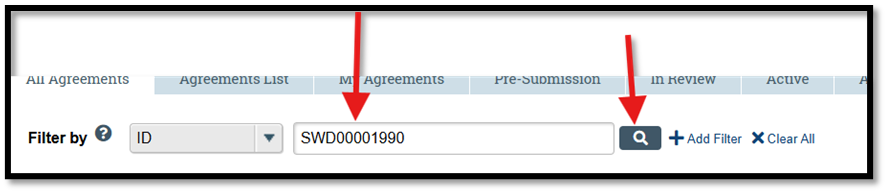
Figure 2. Create Amendment

Figure 3. Amendment Information SmartForm

News Categories