
In response to user feedback, the ‘Changes Requested by Department’ email notification has been modified to include members of the proposal team (see Figure 1).
Project Updates
Change in MyFunding Personnel Compliance Tab
The Personnel Compliance tab has been changed in MyFunding (see Figure 1 for example).
Changes include:
1 – ‘IP Assignment’ column will display ‘Not on File’ or ‘On File’.
2 – ‘CITI Training’ column has been added to include the Responsible Conduct of Research (RCR) and Conflicts of Interest (COI) trainings, status, and expiration date(s).
3 – ‘Most Recent COI Disclosure’ column has been added.
Figure 1.
New Sponsor/Subrecipient Email Requests
When a Sponsor or Subrecipient is not listed in MyFunding, contact the PERISTM Team at peristeam@pitt.edu to have the organization added to the solution for selection.
UPDATE - MyFunding Upgrade of the SF424
The SF424 forms that are used for System-to-System (i.e.
Change in MyFunding Notification - Email Proposal Team
In response to user feedback, the ‘Email Proposal Team’ email notification has been changed to only include members of the proposal team (see Figure 1).
MyFunding Notification Enhancement
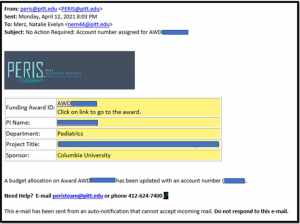
In response to user feedback, the ‘Account Number Assigned’ email notification has been enhanced to include additional descriptors (see Figure 1).
New descriptors include:
1 - PI Name
2 - Department
3 - Project Title
4 - Sponsor
Figure 1.

MyFunding Enhancements
In response to user feedback, the MyFunding module has been enhanced to include two additional search filters (see figures 2 and 3).
New filters include:
1 - Search by ‘PI First Name’ on the proposal side of MyFunding
2 - Add ‘ID’ as a filter for selecting a subaccount department on the general budget information smartform
Figure 1. PI First Name Filter
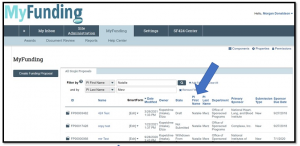 Figure 2.
 Figure 2.
UPDATE - RE: ALERT: MyFunding Downtime 3/8/2021
RESOLVED
This issue affecting the SF-424 (System-to-System) applications in MyFunding has been resolved. Thank you for your patience during this time.
UPDATE - RE: ALERT: Issue Affecting Indirect Cost Rate Question in MyFunding
RESOLVED
The underlying issue with the indirect cost rate question in MyFunding has been resolved. Thank you for your patience during this time.
UPDATE: MyFunding Upgrade of the SF424
The SF-424 forms that are used for system-to-system submissions have been upgraded in MyFunding.
Upgrades include:
- PHS Human Subjects and Clinical Trials Information V3.0 form updated to support new states and countries.
- Added support for Project Abstract Summary V2.0 form
Please Note: The Research & Related Subaward Budget form with an expiration date 12/31/2022, as depicted below, can now be imported into the SF-424 application.