
In consideration of the two large federal grant deadlines that will be occurring in February and March, the PERIS™ team will delay the rollout of Award Activations in the MyFunding module from February 18th, 2019 until March 11th, 2019.
Over the next month, the PERIS™ Team will continue to conduct training sessions for the activation of awards in the MyFunding Module.
Project Updates
MyFunding Award Activation Training for Research Administrators-Additional Sessions Now Open
The PERIS™ Project Team is pleased to announce additional MyFunding Award Activation training sessions for research administrators. These interactive, hands-on training sessions will focus on activating a new award, modifying an existing award, and preparing and submitting progress reports in the MyFunding module.
Each session can accommodate a limited number of individuals and will be led by members of the PERIS™ project team.
To register for a session, please use the links below.
Happy Holidays from the PERIS™ Team
Happy Holidays from the PERIS™ Team

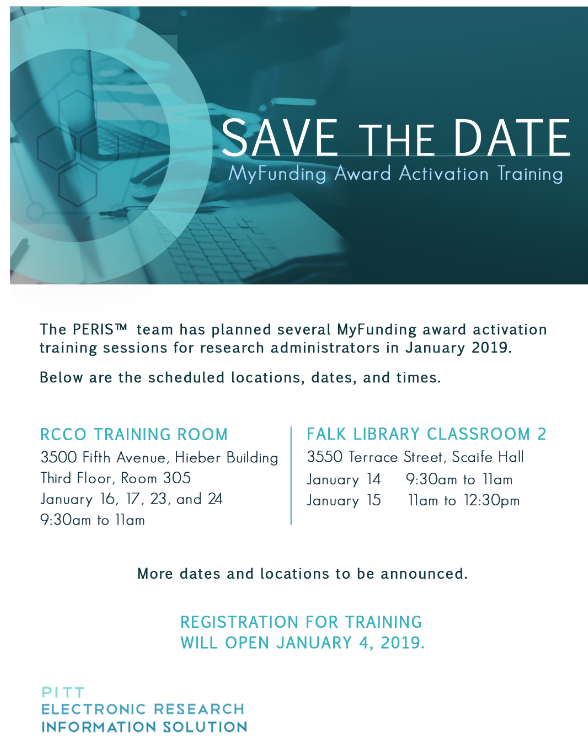
Save the Date: MyFunding Award Activation Training
Save the Date: MyFunding Award Activation Training
MyFunding Module Updates
As part of MyFunding periodic maintenance, several updates have been implemented within the module. Outlined below is a description and brief overview of each update.
• Copy Activity- The funding proposal ‘Copy’ feature has been updated to copy only data into the new funding proposal. The attachments, history, SF424 (if applicable), and PI Certification will not be included in a copied funding proposal.
MyFunding Upgrade of the SF424
On Saturday, October 6, 2018, the MyFunding module of the PERIS™ portal, was upgraded in response to changes implemented by Grant.gov.
Users will notice aesthetic changes to the forms within the SF424 form set. One aesthetic change to note is the consolidation of the “SF424 Research and Related (R&R) Forms”. No changes were made to the functionality of the module or to the content of the SF424 forms.
Consolidated MyFunding Quick Guide
At the request of the research community, the PERIS™ team has created a consolidated Quick Guide to assist users with the MyFunding module. The consolidated Quick Guide is arranged in the same order as the smartforms are presented within a funding proposal in MyFunding. For any questions related to the PERIS™ project, using MyFunding, or to arrange training, please email perisproject@pitt.edu, or visit the project website for more information.
Addition of the Principal Investigator (PI) to the Inbox and Searching for a PI
In response to user feedback, the MyFunding module has been updated to include the Principal Investigator (PI) in the “My Inbox” heading.
New Funding Proposal Notifications
In accordance with the tip on “Updating a Proposal Submission in MyFunding” on January 19, 2018, it is imperative that the state of the funding proposal be changed for proposals that are submitted directly by the department to the sponsor. This ensures that the proposal record is up-to-date and reflected accurately in MyFunding.
MyFunding User Training Site Update
The PERIS™ MyFunding user training environment has been updated to allow users to log in as different roles (i.e. Principal Investigator, Department Administrator, School Reviewer). Signing in as different roles allows the user to experience and understand the solution from different perspectives.
To access the PERIS™ MyFunding training environment, please click here.